Launch-n-Go3.0
Publisher Description
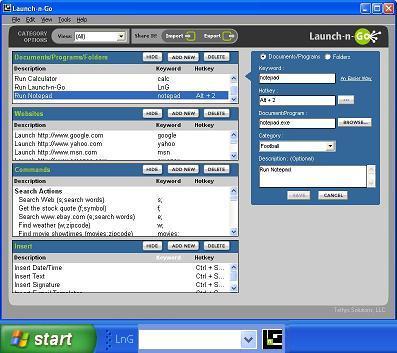
Speed up your day with Launch-n-Go. It is a smart multipurpose productivity tool. A Text Inserter, Program Launcher, Keyboard macro, Shortcut Manager & Desktop Toolbar - all in one!
Save time & eliminate errors with Launch-n-Go's text inserter. Type important text once, & paste it into any email, document or web form. Or use the text expander feature and expand abbreviations as you type them.
To use it as a program launcher, simply assign a hotkey or keyword to any document, program or website. With a single keystroke, you can access your spreadsheet, play your favorite song, or visit website of your choice.
Launch-n-Go's search gives you Internet search results, without opening a web browser. Use popular Internet search engines to get stock quotes, weather reports, sports scores, etc.
Launch-n-Go adds a new dimension with its simple peer-to-peer way to share shortcuts. You can easily create shortcuts pertaining to your interest & share with friends or colleagues.
A powerful, easy to use multi-function program that puts action & information at your fingertips.
Now supports Windows 8, Windows Server 2012 and 2008
About Launch-n-Go
This Launchers & Task Managers program is available in English. It was last updated on 29 September, 2026. Launch-n-Go is compatible with the following operating systems: Windows.
The company that develops Launch-n-Go is Automation Anywhere, Inc.. The latest version released by its developer is 3.0. This version was rated by 6 users of our site and has an average rating of 3.3.
The download we have available for Launch-n-Go has a file size of 2.1 MB. Just click the green Download button above to start the downloading process. The program is listed on our website since 2013-06-20 and was downloaded 422 times. We have already checked if the download link is safe, however for your own protection we recommend that you scan the downloaded software with your antivirus. Your antivirus may detect the Launch-n-Go as malware if the download link is broken.
How to install Launch-n-Go on your Windows device:
- Click on the Download button on our website. This will start the download from the website of the developer.
- Once the Launch-n-Go is downloaded click on it to start the setup process (assuming you are on a desktop computer).
- When the installation is finished you should be able to see and run the program.
Program Details
System requirements
Download information
Pricing
Version History
version 3.0
posted on 2013-06-20
Windows 8, Windows 2012/2008 support, floating Launch-n-Go toolbar, ability to print hotkeys and keywords for ready reference.
version 2.5
posted on 2007-05-18
Vista support, floating Launch-n-Go toolbar, ability to print hotkeys and keywords for ready reference.
